
Hurdlr: Mileage, Expense & Tax
Hurdlr, Inc.Finance
4.24.76K Reviews
- Version
- 42.2.5
- Installs
- 100.00K
- Age Rating
- Everyone
Screenshots
Our Review of Hurdlr: Mileage, Expense & Tax
 Analysis by Appyee
I find mileage and expense records easiest to neglect when work gets busy, and that can turn tax time into a pile of small mysteries. Hurdlr: Mileage, Expense & Tax is built for people who want to bring those scattered details together. I’d look at it less as a replacement for every accounting task and more as a day-to-day record keeper for independent workers who need to see where business money is going.
First Impressions
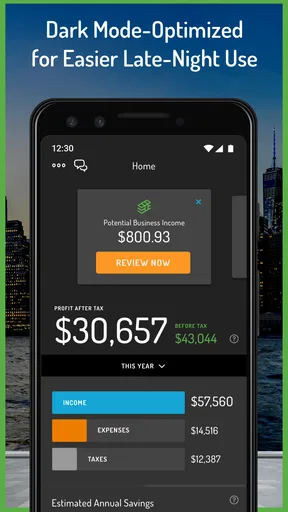
The first thing I noticed about Hurdlr is its clean and intuitive interface. It’s not cluttered with unnecessary features, which is a big plus. When you open the app, you’re greeted with a dashboard that gives you a quick overview of your income, expenses, and tax estimates. This is super handy for those of us who like to see everything at a glance.
Readable at a Glance, With a Learning Curve
A dashboard is useful only if I can understand it quickly, and Hurdlr’s overview gives me a practical starting point rather than making me hunt through separate records first. That matters when I’m checking finances between jobs or trying to decide whether an expense needs attention. Still, a quick summary is not the same as a full bookkeeping explanation: if you are new to self-employment, you may need time to learn what each figure means and which records should support it.
Hurdlr is a finance app from Hurdlr, Inc. It is free to download, has a 4.3 average from around 9,000 ratings, and has been installed over 100,000 times. The app is rated for Everyone, though that broad age label does not mean every financial workflow will feel simple to every user. Its current version is 42.2.5, and in-app purchases range from $5.99 to $99.99 per item, so I would check the available options before building a routine around a paid capability.
Mileage Tracking Made Easy
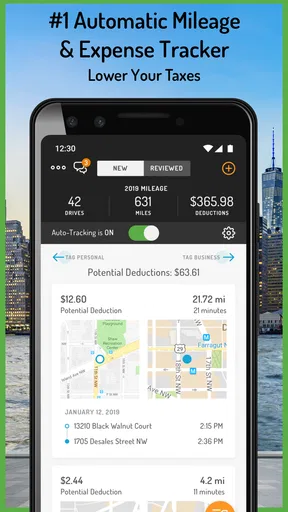
One of the standout features of Hurdlr is its mileage tracking capability. It uses GPS to automatically track your trips, which means you don’t have to manually log every single journey. You can categorize trips as personal or business with a simple swipe. This is a game-changer for anyone who spends a lot of time on the road and wants to ensure they’re getting every tax deduction they deserve.
The useful habit here is to review trips while the purpose is still fresh. If I waited until the end of a busy week, a drive to meet a client could be hard to distinguish from a personal errand. A quick classification after a trip helps keep the record meaningful, especially when a day includes both kinds of driving. Automatic capture reduces the burden of remembering every journey, but it does not remove the need to check that a trip is categorized correctly.
Expense Tracking Features
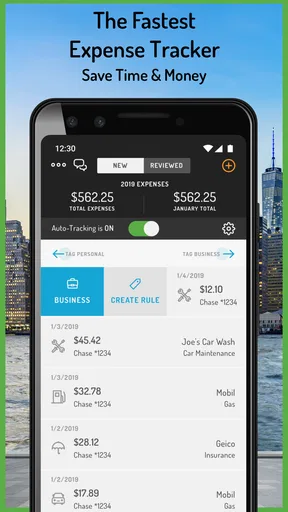
Tracking expenses is often where things get tricky, but Hurdlr makes it surprisingly straightforward. You can connect your bank accounts to automatically import transactions, or you can manually enter expenses if you prefer. The app categorizes expenses for you, which is a huge time-saver. Plus, snapping a photo of your receipts means you won’t have to sift through a shoebox full of paper at the end of the year.
For a practical routine, I’d pair the receipt image with a quick review of the imported transaction rather than assuming the two will always tell the whole story on their own. A bank entry can show that money was spent, while a receipt helps preserve what the purchase was for. If a transaction is ambiguous or includes both personal and work items, setting aside a moment to sort it is safer than letting an automatic category stand without thought. People who prefer not to connect accounts can use manual entry, though that choice trades convenience for more regular upkeep.
Tax Estimates and More
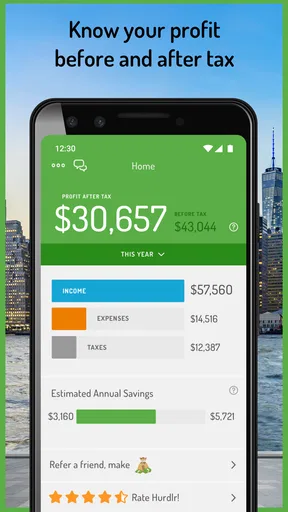
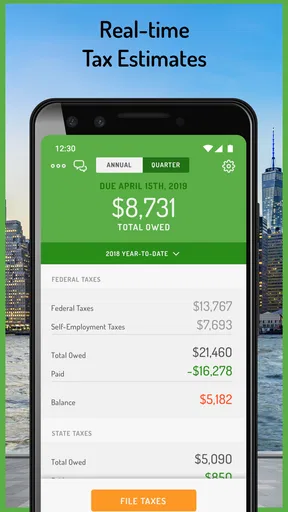
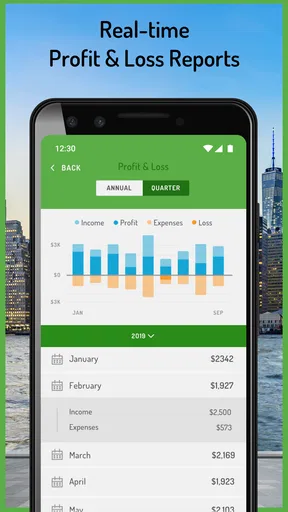
Now, let’s talk about the tax feature. Hurdlr automatically calculates your potential tax deductions and provides real-time tax estimates. This is incredibly useful for freelancers who might not have a steady income and need to set aside the right amount for taxes. The app also generates detailed financial reports, which you can export when it’s time to file your taxes.
I would treat an estimate as a planning aid, not a final tax decision. For someone whose income varies, seeing an updated picture can make it easier to reserve money instead of discovering a shortfall later. But unusual deductions, changing circumstances, and questions about how a purchase should be treated still call for careful judgment. A report can organize the records you have; it cannot make an incomplete or incorrectly categorized record reliable by itself.
One useful approach is to check the estimate on a regular schedule, such as when reviewing monthly expenses, rather than waiting until filing season. That turns the number into a prompt to adjust your savings habit, not a last-minute surprise. If your finances include several business activities or complicated tax situations, I would use Hurdlr to keep documentation in order while getting qualified help for decisions that need more than an estimate.
Integrations and Compatibility
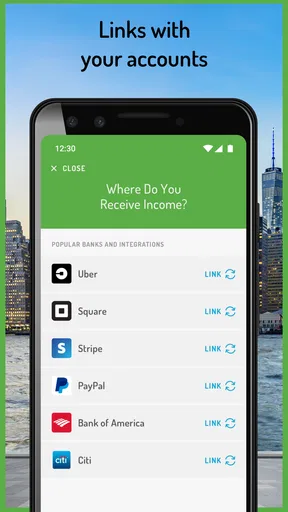
What’s cool about Hurdlr is its ability to integrate with a bunch of other platforms. Whether you’re using QuickBooks, FreshBooks, or even Uber, the app syncs seamlessly to pull in data, making your life a whole lot easier. It’s available on both Android and iOS, so you can track your finances on the go, regardless of your device.
Integrations are most helpful when they reduce duplicate entry in a workflow you already use. Before relying on a connection, I’d check which records are arriving and whether they are being categorized as expected; syncing information does not guarantee that every imported item is ready for tax reporting. If you already keep your books in a dedicated accounting tool, Hurdlr may work best as a companion for mileage and everyday capture rather than as a reason to abandon a system you trust.
Motor and Sensory Considerations
On the move, automatic trip capture can be valuable because it reduces the need to type while traveling. I would still wait until safely parked before sorting a trip or reviewing an expense. The swipe-based trip categorization is simple in principle, but anyone who finds gestures difficult may prefer to take more time with the app when settled, rather than trying to complete actions in a hurry.
For sensory comfort, the restrained dashboard described in my first impression is a welcome starting point: it keeps the main financial picture from feeling crowded. Yet a clean screen cannot solve every access need. People who rely on particular text sizes, screen readers, contrast settings, or other device accommodations should test the screens they use most—especially trip classification and receipt handling—on their own phone before depending on the app for daily records.
A Workday That Shows the Trade-Off
Picture a self-employed worker driving to a morning client visit, stopping for supplies, then taking a personal detour before heading home. Hurdlr can capture the driving in the background, but the worker still needs to separate the business leg from personal travel and make sure the supply purchase is correctly recorded. Later, a glance at the tax estimate can help them decide how much of that week’s income to reserve. This is where the app’s combination makes sense: it brings travel, spending, and tax planning into one routine, while leaving the user responsible for context.
The best time-saving trick is not to wait for a perfect weekly bookkeeping session. I’d make short checks part of natural pauses: classify the completed drive when parked, photograph a receipt after a purchase, and review imported transactions during a quiet moment. Those small actions reduce the chance that an entry becomes an unrecognizable line weeks later. If a person’s work involves very few trips and only occasional expenses, though, a basic spreadsheet and a folder of receipts may be simpler than maintaining another app.
User Experience
As someone who appreciates efficiency, I love that Hurdlr doesn’t bombard you with notifications or unnecessary updates. It runs quietly in the background, doing its thing, while you focus on your work. The app is fast, responsive, and doesn’t drain your phone’s battery, which is a big plus in my book.
Because mileage tracking relies on GPS, people should also think about when they want automatic trip recording active and how that fits their comfort with location-based tracking. I would check the app’s current settings and make an informed choice before using it on every journey. A driver who wants to record business travel but keep personal movements separate should make trip review a deliberate part of the routine, rather than treating background tracking as a finished log.
Who Will Get the Most From It
I’d recommend Hurdlr most readily to freelancers, contractors, and small business owners who drive for work and have enough recurring expenses that manual notes become unreliable. It is especially appealing if you want mileage, receipts, and tax estimates close together instead of spread across a notebook, a camera roll, and a separate calculator. The automatic tracking and transaction imports can help people who are comfortable checking and correcting records but dislike entering every detail from scratch.
It may be a poor fit for someone who rarely has business travel, wants a full accounting system for a larger operation, or does not want financial records connected to an app. Those users may prefer a spreadsheet, a paper log, or a dedicated accounting product that better matches their existing process. Likewise, if you need your tax software to make complex filing decisions, Hurdlr’s estimates and reports should not be mistaken for that kind of service.
Compared with the usual alternatives, its appeal is convenience across several everyday tasks rather than deep specialization in just one. A mileage-only tracker may keep driving records more focused, while a bookkeeping platform may offer a broader accounting workflow. A spreadsheet gives more control but depends on consistent manual entry. Hurdlr sits between those approaches: it automates some collection and organizes useful records, yet still benefits from regular human review.
Is It Worth It?
So, is Hurdlr worth downloading? If you’re a freelancer, small business owner, or just someone who wants to keep better track of their finances, I’d say absolutely. It’s a comprehensive tool that simplifies the often daunting task of managing expenses, tracking mileage, and staying on top of taxes. Plus, the time you save is worth its weight in gold.
I’d add one qualification: the time saved depends on setting it up around the way you actually work and checking its records often enough to catch mistakes. The free starting point makes it approachable, while the in-app purchase range means it is sensible to inspect which capabilities match your needs before paying. The app first appeared on August 6, 2015, and its ongoing version number shows that it has continued to evolve; regardless, the best test is whether its current workflow feels comfortable on your device.
In conclusion, Hurdlr is a well-rounded app that delivers exactly what it promises. It’s user-friendly, efficient, and packed with features that make financial management a breeze. Whether you’re new to expense tracking or an old pro, this app is definitely worth a look. Give it a try, and you might just find it becomes an indispensable part of your financial toolkit.
For inclusive use, I’d call it promising rather than universally effortless. Automatic capture and a relatively uncluttered overview can reduce repeated work, while gestures, location-based tracking, and the need to review tax-related records may create friction for some people or situations. If those trade-offs suit your daily routine, Hurdlr can make financial admin feel more manageable; if they do not, a simpler manual method or a more specialized tool may be the kinder choice.
Verdict
Strengths of Hurdlr: Mileage, Expense & Tax
- User-friendly interface for easy navigation.
- Automatic mileage tracking saves time.
- Real-time tax estimates for accurate planning.
- Supports various income streams seamlessly.
- Data export options for detailed reports.
Limitations of Hurdlr: Mileage, Expense & Tax
- Limited features in the free version.
- Occasional syncing issues with bank accounts.
- Some features require manual input.
- Can be overwhelming for non-business users.
- Customer support response can be slow.
Similar Picks in This Category
View All
Google Wallet
Google LLC4.3

Airtel: Recharge, Bank & Loans
Airtel4.0

PayPal - Pay, Send, Save
PayPal Mobile4.2

DANA Indonesia Digital Wallet
PT Espay Debit Indonesia Koe4.5

Binance: Buy Bitcoin & Crypto
Binance Inc.4.8

Cash App
Block, Inc.4.7
Frequently Asked Questions
What features does Hurdlr offer for managing mileage and expenses?
Hurdlr provides automatic mileage tracking, real-time expense management, and seamless integration with bank accounts to categorize expenses accurately. It also offers tax estimation tools, allowing users to stay on top of their finances and tax obligations. This comprehensive suite makes it convenient for freelancers and small business owners to manage their financials efficiently.
How does Hurdlr help with tax calculations?
Hurdlr uses real-time data to estimate your tax obligations throughout the year. By tracking your income and expenses, it provides accurate quarterly tax estimates and end-of-year tax projections. This feature helps users avoid surprises at tax time and ensures they are setting aside enough funds for tax payments.
Is Hurdlr suitable for freelancers and small business owners?
Absolutely, Hurdlr is designed with freelancers and small business owners in mind. It automates many of the tedious financial tasks such as tracking income, expenses, and mileage, freeing up time to focus on growing the business. Its tax estimation and reporting capabilities make it an invaluable tool for independent entrepreneurs.
Can Hurdlr sync with my bank account?
Yes, Hurdlr can connect with your bank account to automatically import and categorize transactions. This feature helps streamline the process of tracking expenses and income, ensuring accurate financial records. Users can easily review and verify transactions within the app, saving time and reducing manual entry errors.
Is my financial data secure with Hurdlr?
Hurdlr prioritizes user security by employing bank-grade encryption and data protection protocols. The app ensures that your financial information is securely stored and only accessible by you. Users can confidently use the app knowing that their sensitive financial data is protected against unauthorized access.
